iOS WebView application example
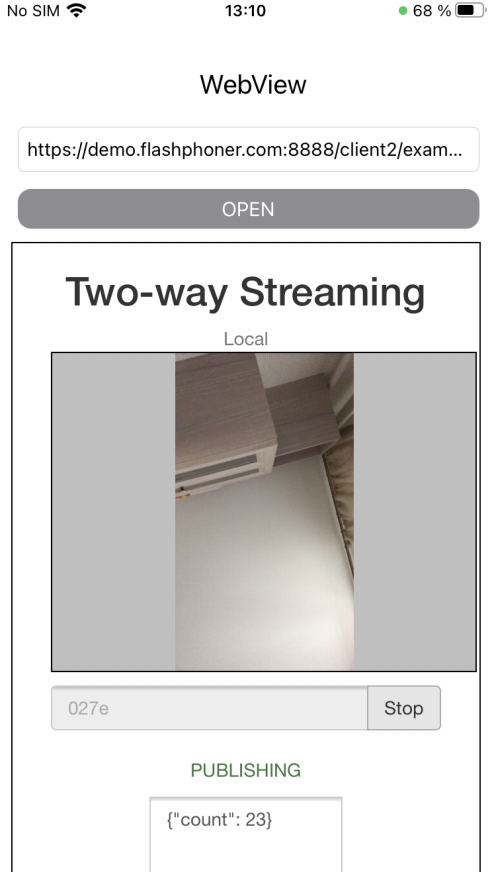
This example can be used to open any Web SDK example page just like in browser. To open a page, an URL must be set. Fore example, Two Way Streaming example form demo server https://demo.flashphoner.com/client2/examples/demo/streaming/two_way_streaming/two_way_streaming.html looks like this
Analyzing example code
To analyze the code, take WebViewSwift example version available on GitHub:
- main application view class WebViewController (implementation file WebViewController.swift)
1. WKWebView object initalizing
Here applicationNameForUserAgent parameter is set to "Safari" for WebSDK old builds compatibility. In those builds, browser type for WKWebKit default user agent may be detected incorrectly. This is not required after updating WebSDK to build 2.0.171 or newer
    lazy var webView: WKWebView = {
        let webConfiguration = WKWebViewConfiguration()
        webConfiguration.allowsInlineMediaPlayback = true
        webConfiguration.mediaTypesRequiringUserActionForPlayback = []
        webConfiguration.applicationNameForUserAgent = "Safari" //Fix for old version of WebSDK
        let webView = WKWebView(frame: .zero, configuration: webConfiguration)
        webView.uiDelegate = self
        webView.translatesAutoresizingMaskIntoConstraints = false
        return webView
    }()
2. URL opening
        if let url = URL(string: urlText) {
            webView.load(URLRequest(url: url));
        }