| Table of Contents |
|---|
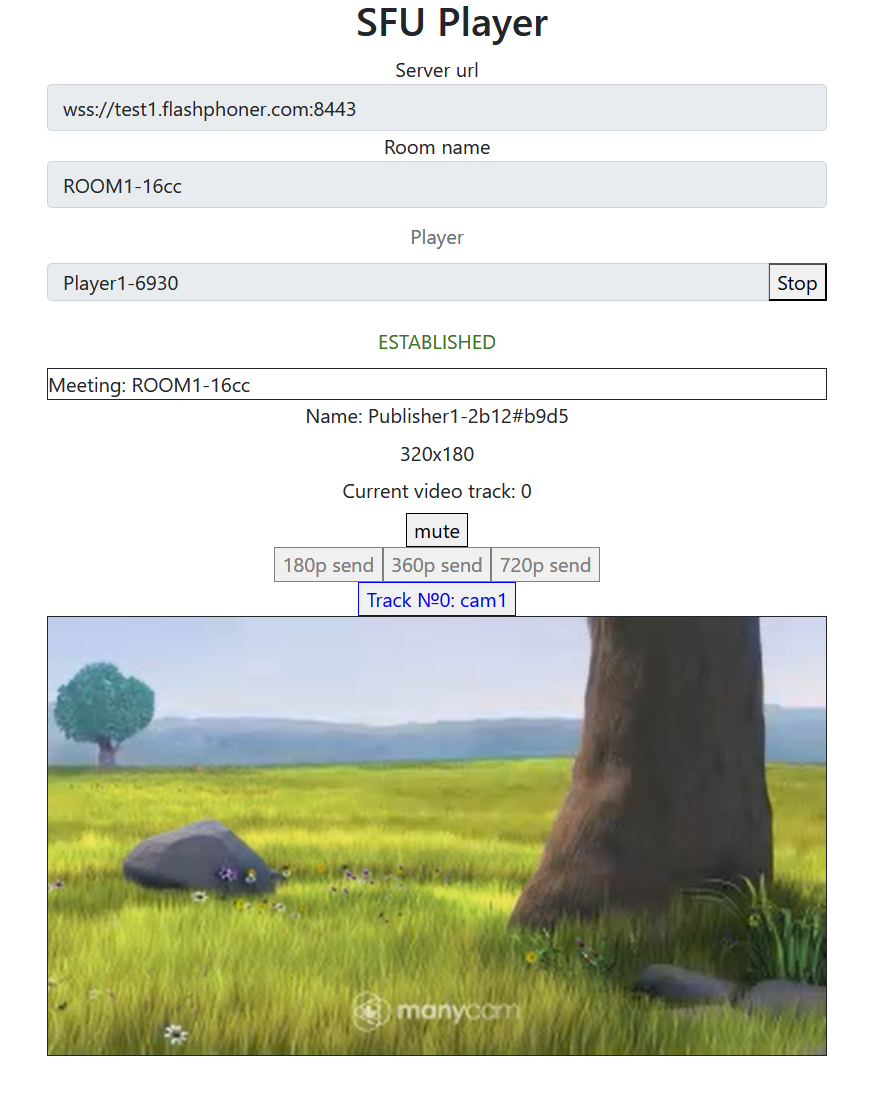
Пример демонстрирует проигрывание одного или нескольких потоков в нескольких качествах в одном WebRTC соединении. Единицей публикации считается комната, то есть зрители, подключившись к этой комнате, получают все опубликованные в ней потоки.
На скриншотах нижеThe example shows how to play a number of streams in one WebRTC connection with simulcast. A room is considered to be a publishing unit, that is, viewers who connect to this room receive all the streams published in it.
On the screenshots below:
- Server url - Websocket URL of WCS
...
- server
- Room name -
...
- room name
- Player -
...
Обратите внимание, что аудио потоки проигрываются в отдельных элементах
Исходный код примера
...
- viewer nickname
- 180p send, 360p send , 720p send -
...
- quality switch buttons
Note that audio tracks are playing in a separate audio tags.
Example source code
The source code consists of the following modules:
- player.html - HTML
...
- page
- player.css -
...
- HTML
...
- page styles
- player.js -
...
- main application logic
- config.json -
...
Анализ исходного кода
Для работы с исходным кодом примера возьмем версию файла player.js, доступную здесь
1. Локальные переменные
...
- client configuration file, contains room description
Analyzing the code
To analyze the example source code, take the file player.js version available here
1. Local variables
Local variables declaration to work with constants, SFU SDK, to display video and to work with client configuration
| Code Block | ||||
|---|---|---|---|---|
| ||||
const constants = SFU.constants; const sfu = SFU; let mainConfig; let remoteDisplay; let playState; const PLAY = "play"; const STOP = "stop"; const PRELOADER_URL="../commons/media/silence.mp3" |
2.
...
Default configuration
Default room configuration to use if there is no config.json file found
| Code Block | ||||
|---|---|---|---|---|
| ||||
const defaultConfig = {
    room: {
        url: "ws://127.0.0.1:8080",
        name: "ROOM1",
        pin: "1234",
        nickName: "User1"
    }
}; |
3.
...
Object to store current playback state
The object should keep Websocket session data, WebRTC connection data and room data, and shoukd form HTML tags ids to access them from code.
| Code Block | ||||
|---|---|---|---|---|
| ||||
const CurrentState = function(prefix) {
    let state = {
        prefix: prefix,
        pc: null,
        session: null,
        room: null,
        roomEnded: false,
        set: function(pc, session, room) {
            state.pc = pc;
            state.session = session;
            state.room = room;
            state.roomEnded = false;
        },
        clear: function() {
            state.room = null;
            state.session = null;
            state.pc = null;
            state.roomEnded = false;
        },
        setRoomEnded: function() {
            state.roomEnded = true;
        },
        buttonId: function() {
            return state.prefix + "Btn";
        },
        buttonText: function() {
            return (state.prefix.charAt(0).toUpperCase() + state.prefix.slice(1));
        },
        inputId: function() {
            return state.prefix + "Name";
        },
        statusId: function() {
            return state.prefix + "Status";
        },
        formId: function() {
            return state.prefix + "Form";
        },
        errInfoId: function() {
            return state.prefix + "ErrorInfo";
        },
        is: function(value) {
            return (prefix === value);
        },
        isActive: function() {
            return (state.room && !state.roomEnded && state.pc);
        },
        isConnected: function() {
            return (state.session && state.session.state() === constants.SFU_STATE.CONNECTED);
        },
        isRoomEnded: function() {
            return state.roomEnded;
        }
    };
    return state;
} |
4.
...
Initialization
init() codeФункция
The init()
...
function is called on page load and:
- initializes state objects
- reads
config.jsonfile or default configuration - initializes input fields
| Code Block | ||||
|---|---|---|---|---|
| ||||
const init = function() {
    let configName = getUrlParam("config") || "./config.json";
    ...
    playState = CurrentState(PLAY);
    $.getJSON(configName, function(cfg){
        mainConfig = cfg;
        onDisconnected(playState);
    }).fail(function(e){
        //use default config
        console.error("Error reading configuration file " + configName + ": " + e.status + " " + e.statusText)
        console.log("Default config will be used");
        mainConfig = defaultConfig;
        onDisconnected(playState);
    });
    $("#url").val(setURL());
    $("#roomName").val("ROOM1-"+createUUID(4));
    $("#playName").val("Player1-"+createUUID(4));
} |
5.
...
Establishing server connection
connect(), SFU.createRoom() codeФункция
The connect()
...
function is called by Publish or Play click:
- creates PeerConnection object
- cleans the previous session state displayed
- sets up room configuration and creates Websocket session
- subscribes to Websocket session events
| Code Block | ||||
|---|---|---|---|---|
| ||||
const connect = async function(state) {
    //create peer connection
    const pc = new RTCPeerConnection();
    //get config object for room creation
    const roomConfig = getRoomConfig(mainConfig);
    roomConfig.url = $("#url").val();
    roomConfig.roomName = $("#roomName").val();
    roomConfig.nickname = $("#" + state.inputId()).val();
    // clean state display items
    setStatus(state.statusId(), "");
    setStatus(state.errInfoId(), "");
    // connect to server and create a room if not
    try {
        const session = await sfu.createRoom(roomConfig);
        // Set up session ending events
        session.on(constants.SFU_EVENT.DISCONNECTED, function() {
            onStopClick(state);
            onDisconnected(state);
            setStatus(state.statusId(), "DISCONNECTED", "green");
        }).on(constants.SFU_EVENT.FAILED, function(e) {
            onStopClick(state);
            onDisconnected(state);
            setStatus(state.statusId(), "FAILED", "red");
            if (e.status && e.statusText) {
                setStatus(state.errInfoId(), e.status + " " + e.statusText, "red");
            } else if (e.type && e.info) {
                setStatus(state.errInfoId(), e.type + ": " + e.info, "red");
            }
        });
        // Connected successfully
        onConnected(state, pc, session);
        setStatus(state.statusId(), "ESTABLISHED", "green");
    } catch(e) {
        onDisconnected(state);
        setStatus(state.statusId(), "FAILED", "red");
        setStatus(state.errInfoId(), e, "red");
    }
} |
6.
...
Playback start after session establishing
onConnected() codeФункция
The onConnected() function:
...
- sets up Stop button click actions
- subscribes to room error events
- calls playback function
| Code Block | ||||
|---|---|---|---|---|
| ||||
const onConnected = async function(state, pc, session) {
    state.set(pc, session, session.room());
    $("#" + state.buttonId()).text("Stop").off('click').click(function () {
        onStopClick(state);
    });
    $('#url').prop('disabled', true);
    $("#roomName").prop('disabled', true);
    $("#" + state.inputId()).prop('disabled', true);
    // Add errors displaying
    state.room.on(constants.SFU_ROOM_EVENT.FAILED, function(e) {
        setStatus(state.errInfoId(), e, "red");
        state.setRoomEnded();
        onStopClick(state);
    }).on(constants.SFU_ROOM_EVENT.OPERATION_FAILED, function (e) {
        onOperationFailed(state, e);
    }).on(constants.SFU_ROOM_EVENT.ENDED, function (e) {
        setStatus(state.errInfoId(), "Room "+state.room.name()+" has ended", "red");
        state.setRoomEnded();
        onStopClick(state);
    }).on(constants.SFU_ROOM_EVENT.DROPPED, function (e) {
        setStatus(state.errInfoId(), "Dropped from the room "+state.room.name()+" due to network issues", "red");
        state.setRoomEnded();
        onStopClick(state);
    });
    await playStreams(state);
    // Enable button after starting playback #WCS-3635
    $("#" + state.buttonId()).prop('disabled', false);
} |
7.
...
Streams playback
playStreams(), SFURoom.join(), initRemoteDisplay() codeФункция
The playStreams()
...
function:
- initializes a base container tag to display incoming media streams
- negotiates WebRTC connection
| Code Block | ||||
|---|---|---|---|---|
| ||||
const playStreams = async function(state) {
    //create remote display item to show remote streams
    try {
        remoteDisplay = initDefaultRemoteDisplay(state.room, document.getElementById("remoteVideo"), {quality: true});
        // Start WebRTC negotiation
        await state.room.join(state.pc, null, null, 1);
    } catch(e) {
        if (e.type === constants.SFU_ROOM_EVENT.OPERATION_FAILED) {
            onOperationFailed(state, e);
        } else {
            console.error("Failed to play streams: " + e);
            setStatus(state.errInfoId(), e.name, "red");
            onStopClick(state);
        }
    }
} |
8.
...
Playback stopping
stopStreams(), remoteDisplay.stop() code
| Code Block | ||||
|---|---|---|---|---|
| ||||
const stopStreams = function(state) {
    if (remoteDisplay) {
        remoteDisplay.stop();
    }
} |
9.
...
Play click action
onStartClick(), playFirstSound(), connect() code
Функция The onStartClick() function:
- проверяет правильность заполнения полей ввода
- перед стартом воспроизведения, в браузере Safari вызывает функцию playFirstSound() для автоматического проигрывания аудио
- вызывает функцию connect()validates input fields
- in Safari browser, calls playFirstSound() before playback to automatically play incoming audio
- calls connect() function
| Code Block | ||||
|---|---|---|---|---|
| ||||
const onStartClick = function(state) {
    if (validateForm("connectionForm") && validateForm(state.formId())) {
        $("#" + state.buttonId()).prop('disabled', true);
        if (state.is(PLAY) && Browser().isSafariWebRTC()) {
            playFirstSound(document.getElementById("main"), PRELOADER_URL).then(function () {
                connect(state);
            });
        } else {
            connect(state);
        }
    }
} |
10.
...
Stop click actions
onStopClick(), Session.disconnect() codeФункция
The onStopClick() function:
...
- stops playback
- disconects Websocket session
| Code Block | ||||
|---|---|---|---|---|
| ||||
const onStopClick = async function(state) {
    stopStreams(state);
    if (state.isConnected()) {
        $("#" + state.buttonId()).prop('disabled', true);
        await state.session.disconnect();
        onDisconnected(state);
    }
} |
11.
...
Websocket session disconnection actions
onDisconnected() codeФункция
The onDisconnected() functions:
...
- sets up Play click actions
- enables Server url and Room name fields access, if there's no parallel session
| Code Block | ||||
|---|---|---|---|---|
| ||||
const onDisconnected = function(state) {
    state.clear();
    $("#" + state.buttonId()).text(state.buttonText()).off('click').click(function () {
        onStartClick(state);
    }).prop('disabled', false);
    $('#url').prop('disabled', false);
    $("#roomName").prop('disabled', false);
    $("#" + state.inputId()).prop('disabled', false);
} |