The example shows how to publish and play a number of streams in one WebRTC connection with simulcast. A room is considered to be a publishing unit, that is, viewers who connect to this room receive all the streams published in it.
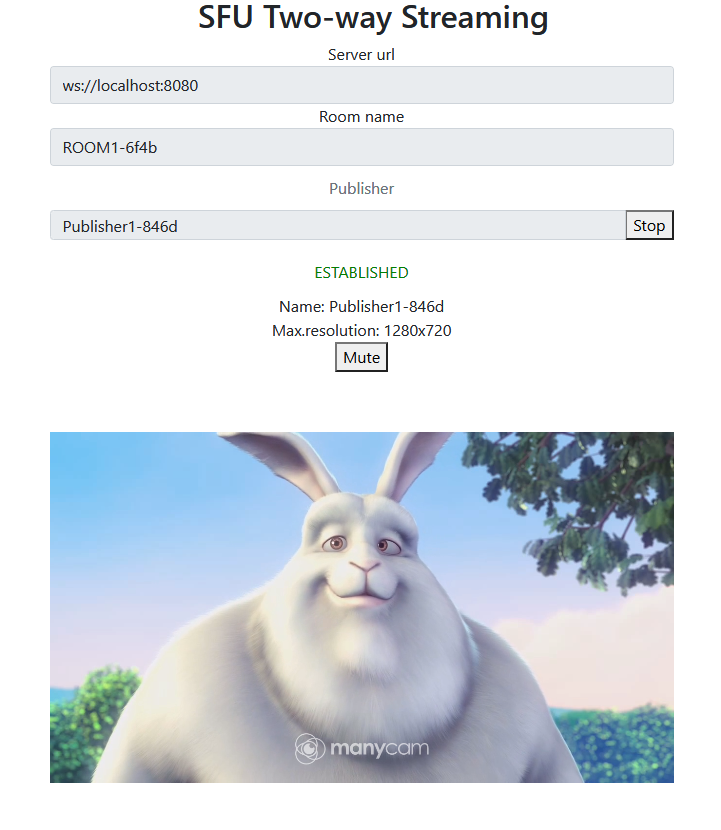
On the screenshots below:
- Server url - Websocket URL of WCS server
- Room name - room name
- Publisher - publisher user name
- Player - viewer user name
- 360p, 720p, 180p send - quality switch buttons
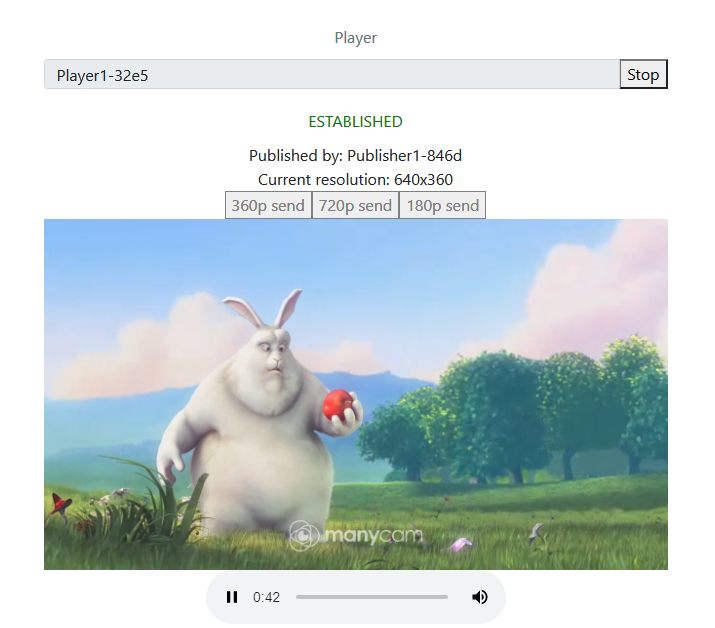
Note that audio tracks are playing in a separate audio tags.
Example source code
The source code consists of the following modules:
- two-way-streaming.html - HTML page
- two-way-streaming.css - HTML page styles
- two-way-streaming.js - main application logic
- config.json - client configuration file, contains streams publishing description
Analyzing the code
To analyze the example source code, take the file two-way-streaming.js version available here
1. Local variables
Local variables declaration to work with constants, SFU SDK, to display video and to work with client configuration
const constants = SFU.constants;
const sfu = SFU;
let mainConfig;
let localDisplay;
let remoteDisplay;
let publishState;
let playState;
const PUBLISH = "publish";
const PLAY = "play";
const STOP = "stop";
const PRELOADER_URL="../commons/media/silence.mp3"
2. Default configuration
Default room configuration and stream publishing configuration to use if there is no config.json file found
const defaultConfig = {
    room: {
        url: "wss://127.0.0.1:8888",
        name: "ROOM1",
        pin: "1234",
        nickName: "User1"
    },
    media: {
        audio: {
            tracks: [
                {
                    source: "mic",
                    channels: 1
                }
            ]
        },
        video: {
            tracks: [
                {
                    source: "camera",
                    width: 640,
                    height: 360,
                    codec: "H264",
                    encodings: [
                        { rid: "360p", active: true, maxBitrate: 500000 },
                        { rid: "180p", active: true, maxBitrate: 200000, scaleResolutionDownBy: 2 }
                    ]
                }
            ]
        }
    }
};
3. Object to store current publishing/playback state
The object should keep Websocket session data, WebRTC connection data and room data, and shoukd form HTML tags ids to access them from code.
const CurrentState = function(prefix) {
    let state = {
        prefix: prefix,
        pc: null,
        session: null,
        room: null,
        timer: null,
        set: function(pc, session, room) {
            state.pc = pc;
            state.session = session;
            state.room = room;
        },
        clear: function() {
            state.stopWaiting();
            state.room = null;
            state.session = null;
            state.pc = null;
        },
        waitFor: function(div, timeout) {
            state.stopWaiting();
            state.timer = setTimeout(function () {
                if (div.innerHTML !== "") {
                    // Enable stop button
                    $("#" + state.buttonId()).prop('disabled', false);
                }
                else if (state.isConnected()) {
                    setStatus(state.errInfoId(), "No media capturing started in " + timeout + " ms, stopping", "red");
                    onStopClick(state);
                }
            }, timeout);
        },
        stopWaiting: function() {
            if (state.timer) {
                clearTimeout(state.timer);
                state.timer = null;
            }
        },
        buttonId: function() {
            return state.prefix + "Btn";
        },
        buttonText: function() {
            return (state.prefix.charAt(0).toUpperCase() + state.prefix.slice(1));
        },
        inputId: function() {
            return state.prefix + "Name";
        },
        statusId: function() {
            return state.prefix + "Status";
        },
        formId: function() {
            return state.prefix + "Form";
        },
        errInfoId: function() {
            return state.prefix + "ErrorInfo";
        },
        is: function(value) {
            return (prefix === value);
        },
        isActive: function() {
            return (state.room && state.pc);
        },
        isConnected: function() {
            return (state.session && state.session.state() == constants.SFU_STATE.CONNECTED);
        }
    };
    return state;
}
4. Initialization
init() code
The init() function is called on page load and:
- initializes state objects
- reads
config.jsonfile or default configuration - initializes input fields
const init = function() {
    let configName = getUrlParam("config") || "./config.json";
    ...
    publishState = CurrentState(PUBLISH);
    playState = CurrentState(PLAY);
    $.getJSON(configName, function(cfg){
        mainConfig = cfg;
        onDisconnected(publishState);
        onDisconnected(playState);
    }).fail(function(e){
        //use default config
        console.error("Error reading configuration file " + configName + ": " + e.status + " " + e.statusText)
        console.log("Default config will be used");
        mainConfig = defaultConfig;
        onDisconnected(publishState);
        onDisconnected(playState);
    });
    $("#url").val(setURL());
    $("#roomName").val("ROOM1-"+createUUID(4));
    $("#publishName").val("Publisher1-"+createUUID(4));
    $("#playName").val("Player1-"+createUUID(4));
}
5. Establishing server connection
connect(), SFU.createRoom() code
The connect() function is called by Publish or Play click:
- creates PeerConnection object
- cleans previous session state displayed
- sets up room configuration and creates Websocket session
- subscribes to Websocket session events
const connect = function(state) {
    //create peer connection
    pc = new RTCPeerConnection();
    //get config object for room creation
    const roomConfig = getRoomConfig(mainConfig);
    roomConfig.pc = pc;
    roomConfig.url = $("#url").val();
    roomConfig.roomName = $("#roomName").val();
    roomConfig.nickname = $("#" + state.inputId()).val();
    // clean state display items
    setStatus(state.statusId(), "");
    setStatus(state.errInfoId(), "");
    // connect to server and create a room if not
    const session = sfu.createRoom(roomConfig);
    session.on(constants.SFU_EVENT.CONNECTED, function(room) {
        state.set(pc, session, room);
        onConnected(state);
        setStatus(state.statusId(), "ESTABLISHED", "green");
    }).on(constants.SFU_EVENT.DISCONNECTED, function() {
        state.clear();
        onDisconnected(state);
        setStatus(state.statusId(), "DISCONNECTED", "green");
    }).on(constants.SFU_EVENT.FAILED, function(e) {
        state.clear();
        onDisconnected(state);
        setStatus(state.statusId(), "FAILED", "red");
        setStatus(state.errInfoId(), e.status + " " + e.statusText, "red");
    });
}
6. Publishing or playback start after session establishing
onConnected() code
The onConnected() function:
- sets up Stop button click actions
- subscribes to room error events
- calls publishing or playback function
const onConnected = function(state) {
    $("#" + state.buttonId()).text("Stop").off('click').click(function () {
        onStopClick(state);
    });
    ...
    // Add errors displaying
    state.room.on(constants.SFU_ROOM_EVENT.FAILED, function(e) {
        setStatus(state.errInfoId(), e, "red");
        stopStreaming(state);
    }).on(constants.SFU_ROOM_EVENT.OPERATION_FAILED, function (e) {
        setStatus(state.errInfoId(), e.operation + " failed: " + e.error, "red");
        stopStreaming(state);
    });
    startStreaming(state);
}
7. Streams publishing
publishStreams(), SFURoom.join() code
The publishStreams() function:
- initializes a basic HTML container tag to display local video
- gets local media access accorging to configuration file
- adds media tracks to WEbRTC connection
- joins the room on server
- starts a timer to wait for successful local video tags initializaton
const publishStreams = async function(state) {
    if (state.isConnected()) {
        //create local display item to show local streams
        localDisplay = initLocalDisplay(document.getElementById("localVideo"));
        try {
            //get configured local video streams
            let streams = await getVideoStreams(mainConfig);
            let audioStreams = await getAudioStreams(mainConfig);
            if (state.isConnected() && state.isActive()) {
                //combine local video streams with audio streams
                streams.push.apply(streams, audioStreams);
                let config = {};
                //add our local streams to the room (to PeerConnection)
                streams.forEach(function (s) {
                    //add local stream to local display
                    localDisplay.add(s.stream.id, $("#" + state.inputId()).val(), s.stream);
                    //add each track to PeerConnection
                    s.stream.getTracks().forEach((track) => {
                        if (s.source === "screen") {
                            config[track.id] = s.source;
                        }
                        addTrackToPeerConnection(state.pc, s.stream, track, s.encodings);
                        subscribeTrackToEndedEvent(state.room, track, state.pc);
                    });
                });
                state.room.join(config);
                // TODO: Use room state or promises to detect if publishing started to enable stop button
                state.waitFor(document.getElementById("localVideo"), 3000);
            }
        } catch(e) {
            console.error("Failed to capture streams: " + e);
            setStatus(state.errInfoId(), e.name, "red");
            state.stopWaiting();
            if (state.isConnected()) {
                onStopClick(state);
            }
        }
    }
}
7.1. Media tracks addition to WebRTC connection
addTrackToPeerConnection(), PeerConnection.addTransceiver() code
const addTrackToPeerConnection = function(pc, stream, track, encodings) {
    pc.addTransceiver(track, {
        direction: "sendonly",
        streams: [stream],
        sendEncodings: encodings ? encodings : [] //passing encoding types for video simulcast tracks
    });
}
7.2. Tracks onended event subscription
subscribeTrackToEndedEvent(), MediaTrack.addEventListener(), SFURoom.updateState() code
const subscribeTrackToEndedEvent = function(room, track, pc) {
    track.addEventListener("ended", function() {
        //track ended, see if we need to cleanup
        let negotiate = false;
        for (const sender of pc.getSenders()) {
            if (sender.track === track) {
                pc.removeTrack(sender);
                //track found, set renegotiation flag
                negotiate = true;
                break;
            }
        }
        if (negotiate) {
            //kickoff renegotiation
            room.updateState();
        }
    });
};
8. Streams playback
playStreams(), SFURoom.join() code
The playStreams() function:
- initializes a base container tag to display incoming media streams
- joins to the room on server
const playStreams = function(state) {
    if (state.isConnected() && state.isActive()) {
        //create remote display item to show remote streams
        remoteDisplay = initRemoteDisplay({
            div: document.getElementById("remoteVideo"),
            room: state.room,
            peerConnection: state.pc
        });
        state.room.join(state.pc);
    }
    $("#" + state.buttonId()).prop('disabled', false);
}
9. Publishing stopping
unPublishStreams(), localDisplay.stop() code
const unPublishStreams = function(state) {
    if (localDisplay) {
        localDisplay.stop();
    }
}
10. Playback stopping
stopStreams(), remoteDisplay.stop() code
const stopStreams = function(state) {
    if (remoteDisplay) {
        remoteDisplay.stop();
    }
}
11. Publish/Play click action
onStartClick(), playFirstSound(), connect() code
The onStartClick() function:
- validates input fields
- in Safari browser, calls playFirstSound() before playback to automatically play incoming audio
- calls connect() function
const onStartClick = function(state) {
    if (validateForm("connectionForm") && validateForm(state.formId())) {
        $("#" + state.buttonId()).prop('disabled', true);
        if (state.is(PLAY) && Browser().isSafariWebRTC()) {
            playFirstSound(document.getElementById("main"), PRELOADER_URL).then(function () {
                connect(state);
            });
        } else {
            connect(state);
        }
    }
}
12. Stop click actions
onStopClick(), Session.disconnect() code
The onStopClick() function:
- stops playback or publishing
- disconects Websocket session
const onStopClick = function(state) {
    $("#" + state.buttonId()).prop('disabled', true);
    stopStreaming(state);
    if (state.isConnected()) {
        state.session.disconnect();
    }
}
13. Websocket session disconnection actions
onDisconnected() code
The onDisconnected() functions:
- sets up Publish/Play click actions
- enables Server url and Room name fields access, if there's no parallel session
const onDisconnected = function(state) {
    $("#" + state.buttonId()).text(state.buttonText()).off('click').click(function () {
        onStartClick(state);
    }).prop('disabled', false);
    $("#" + state.inputId()).prop('disabled', false);
    // Check if other session is active
    if ((state.is(PUBLISH) && playState.session)
       || (state.is(PLAY) && publishState.session)) {
        return;
    }
    $('#url').prop('disabled', false);
    $("#roomName").prop('disabled', false);
}
14. Helper functions
14.1. Start publishing or playback
startStreaming() code
const startStreaming = function(state) {
    if (state.is(PUBLISH)) {
        publishStreams(state);
    } else if (state.is(PLAY)) {
        playStreams(state);
    }
}
14.2. Stop publishing or playback
stopStreaming() code
const stopStreaming = function(state) {
    state.stopWaiting();
    if (state.is(PUBLISH)) {
        unPublishStreams(state);
    } else if (state.is(PLAY)) {
        stopStreams(state);
    }
}