Example of Click to Call application for Android
This example allows to place outgoing audio call with one button click using account specified in server config file
/usr/local/FlashphonerWebCallServer/conf/apps/click-to-call/accounts.xml
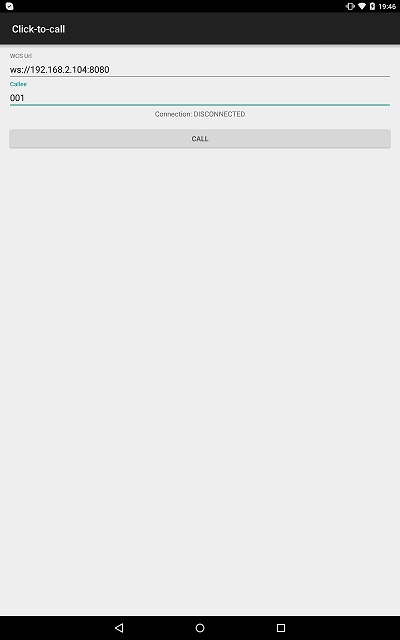
On the screenshot below the example is displayed after terminating a call and closing connection to server
Input fields required for connecting to WCS server and placing a call
- 'WCS URL', where 192.168.2.104 is the address of the WCS server
- 'Callee', where 001 is the SIP username of the callee
Work with code of the example
To analyze the code, let's take class ClickToCallActivity.java of the click-to-call example, which can be downloaded with corresponding build 1.0.1.38.
1. Initialization of the API.
Flashphoner.init() code
For initialization, object Сontext is passed to the init() method.
Flashphoner.init(this);
2. Session creation.
Flashphoner.createSession() code
Object SessionOptions with URL of WCS server is passed to createSession method
SessionOptions sessionOptions = new SessionOptions(mWcsUrlView.getText().toString());
session = Flashphoner.createSession(sessionOptions);
3. Connection to the server.
Session.connect(). code
Connection object with appKey of internal server-side application 'clickToCallApp' is passed to the method
Connection connection = new Connection();
connection.setAppKey("clickToCallApp");
/**
  * Connect to WCS server
  */
session.connect(connection);
4. Receiving the event confirming successful connection.
Session.onConnected(), Session.createCall() code
On this event, outgoung call is created with Session.createCall() method. CallOptions object with callee SIP username is passed to the method.
@Override
public void onConnected(final Connection connection) {
    runOnUiThread(new Runnable() {
        @Override
        public void run() {
            mCallButton.setText(R.string.action_hangup);
            mCallButton.setTag(R.string.action_hangup);
            mCallButton.setEnabled(true);
            mCallStatus.setText("Connection: " + connection.getStatus());

            /**
              * Pass 'callee' to the callOptions and create a new call object
              */
            CallOptions callOptions = new CallOptions(mCalleeView.getText().toString());
            call = session.createCall(callOptions);
            call.on(new CallStatusEvent() {
                ...
            });

            ActivityCompat.requestPermissions(ClickToCallActivity.this,
                  new String[]{Manifest.permission.RECORD_AUDIO},
                  CALL_REQUEST_CODE);
            ...
        }
    });
}
5. Making outgoing call when permissions are granted.
Call.call() code
case CALL_REQUEST_CODE: {
    if (grantResults.length == 0 ||
          grantResults[0] != PackageManager.PERMISSION_GRANTED) {
        mCallButton.setEnabled(false);
        session.disconnect();
        Log.i(TAG, "Permission has been denied by user");
    } else {
        /**
          * Make the outgoing call
          */
        call.call();
        Log.i(TAG, "Permission has been granted by user");
    }
}
6. Disconnection.
Session.disconnect() code
mCallButton.setEnabled(false);
session.disconnect();
7. Receiving the event confirming successful disconnection.
session.onDisconnection() code
@Override
public void onDisconnection(final Connection connection) {
    runOnUiThread(new Runnable() {
        @Override
        public void run() {
            mCallButton.setText(R.string.action_call);
            mCallButton.setTag(R.string.action_call);
            mCallButton.setEnabled(true);
            mCallStatus.setText("Connection: " + connection.getStatus());
        }
    });
}