Android MCU conference participant client example
This example can be used to organize an MCU video conference on Web Call Server. Each participant of such conference can publish a WebRTC stream and play a mixer stream with audio and video from the other participants and own video (without own audio).
The following settings are required in WCS flashphoner.properties
mixer_auto_start=true
mixer_mcu_audio=true
mixer_mcu_video=true
When a participant joins a conference using the client
- a stream with video of the participant, named <participantName> + "#" + <roomName>, is published
- the participant's stream is added to mixer named <roomName> (in case such mixer did not exist, it is auto created)
- a new mixer named <roomName> + "-" + <participantName> + <roomName> and containing video from all the participants (including this one) and audio only from the other participants is created and played for the participant
Input fields
- 'WCS URL', where test.flashphoner.com - WCS server address
- 'Login' - user login
- 'Room' - room name
- 'Transport' - WebRTC transport type
- 'Send Audio' - switcher to enable/disable audio publishing
- 'Send Video' - switcher to enable/disable video publishing
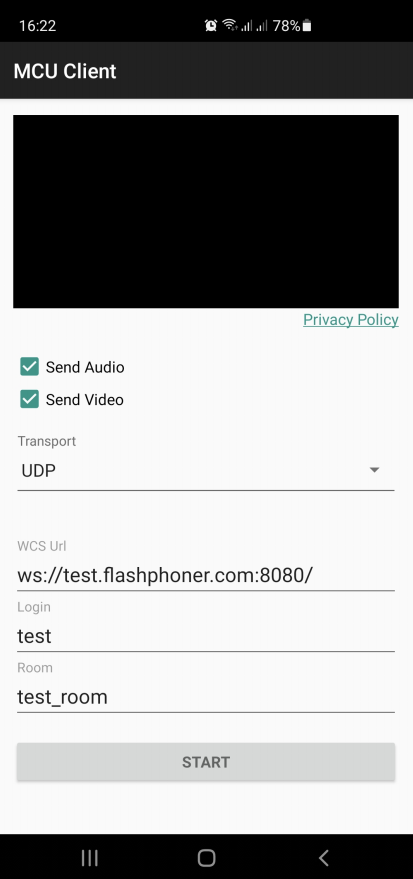
Example code analyzing
To analyze the code use McuClientActivity.java class of mcu-client example which is available in build 1.1.0.24.
1. API intializing
Flashphoner.init() code
Flashphoner.init(this);
A Context object is passed to init() method.
2. Session creation
Flashphoner.createSession() code
A SessionOptions object is passed to createSession method with the following parameters
- URL of WCS server
- SurfaceViewRenderer remoteRenderer to display a mixer stream to playback
sessionOptions = new SessionOptions(mWcsUrlView.getText().toString());
sessionOptions.setRemoteRenderer(remoteRender);

/**
  * Session for connection to WCS server is created with method createSession().
  */
session = Flashphoner.createSession(sessionOptions);
3. Connecting to the server
Session.connect(). code
session.connect(new Connection());
4. Receiving an event confirming successful connection
session.onConnected() code
@Override
public void onConnected(final Connection connection) {
    runOnUiThread(new Runnable() {
        @Override
        public void run() {
            mStatusView.setText(connection.getStatus());
            ...
        }
    });
});
5. Stream creation
Session.createStream() code
                                    StreamOptions streamOptions = new StreamOptions(publishStreamName);
                                    Constraints constraints = getConstraints();
                                    streamOptions.setConstraints(constraints);
                                    streamOptions.setTransport(Transport.valueOf(mTransportOutput.getSpinner().getSelectedItem().toString()));

                                    /**
                                     * Stream is created with method Session.createStream().
                                     */
                                    publishStream = session.createStream(streamOptions);
6. Requesting microphone and camera permissions
ActivityCompat.requestPermissions() code
@Override
public void onConnected(final Connection connection) {
    runOnUiThread(new Runnable() {
        @Override
        public void run() {
            ...
            ActivityCompat.requestPermissions(StreamingMinActivity.this,
                  new String[]{Manifest.permission.RECORD_AUDIO, Manifest.permission.CAMERA},
                  PUBLISH_REQUEST_CODE);
            ...
        }
        ...
    });
});
7. Stream publishing after permissions are granted
Stream.publish() code
    @Override
    public void onRequestPermissionsResult(int requestCode,
                                           @NonNull String permissions[], @NonNull int[] grantResults) {
        switch (requestCode) {
            case PUBLISH_REQUEST_CODE: {
                if (grantResults.length == 0 ||
                        grantResults[0] != PackageManager.PERMISSION_GRANTED ||
                        grantResults[1] != PackageManager.PERMISSION_GRANTED) {
                    muteButton();
                    session.disconnect();
                    Log.i(TAG, "Permission has been denied by user");
                } else {
                    /**
                     * Method Stream.publish() is called to publish stream.
                     */
                    publishStream.publish();
                    Log.i(TAG, "Permission has been granted by user");
                }
                break;
            }
            ...
       }
   }
8. Playing mixer output stream for the participant
Session.createStream(), Stream.play() code
                                    publishStream.on(new StreamStatusEvent() {
                                        @Override
                                        public void onStreamStatus(final Stream stream, final StreamStatus streamStatus) {
                                            runOnUiThread(new Runnable() {
                                                @Override
                                                public void run() {
                                                    if (StreamStatus.PUBLISHING.equals(streamStatus)) {
                                                        /**
                                                         * The options for the stream to play are set.
                                                         * The stream name is passed when StreamOptions object is created.
                                                         */
                                                        String playStreamName = roomName + "-" + login + roomName;
                                                        StreamOptions streamOptions = new StreamOptions(playStreamName);
                                                        streamOptions.setTransport(Transport.valueOf(mTransportOutput.getSpinner().getSelectedItem().toString()));
                                                        playStream = session.createStream(streamOptions);
                                                        ...
                                                        /**
                                                         * Method Stream.play() is called to start playback of the stream.
                                                         */
                                                        playStream.play();
                                                    } else {
                                                        Log.e(TAG, "Can not publish stream " + stream.getName() + " " + streamStatus);
                                                    }
                                                    mStatusView.setText(streamStatus.toString());
                                                }
                                            });
                                        }
                                    });
9. Closing the connection
Session.disconnect() code
        mStartButton.setOnClickListener(new OnClickListener() {
            @Override
            public void onClick(View view) {
                muteButton();
                if (mStartButton.getTag() == null || Integer.valueOf(R.string.action_start).equals(mStartButton.getTag())) {
                    ...
                } else {
                    /**
                     * Connection to WCS server is closed with method Session.disconnect().
                     */
                    session.disconnect();
                }
                ...
            }
        });
10. Receiving an event when connection is closed
session.onDisconnection() code
                        @Override
                        public void onDisconnection(final Connection connection) {
                            runOnUiThread(new Runnable() {
                                @Override
                                public void run() {
                                    mStatusView.setText(connection.getStatus());
                                    mStatusView.setText(connection.getStatus());
                                    onStopped();
                                }
                            });
                        }
11. Audio/video publishing/playback constraints configuration
    @NonNull
    private Constraints getConstraints() {
        AudioConstraints audioConstraints = null;
        if (mSendAudio.isChecked()) {
            audioConstraints = new AudioConstraints();
        }
        VideoConstraints videoConstraints = null;
        if (mSendVideo.isChecked()) {
            videoConstraints = new VideoConstraints();
        }
        return new Constraints(audioConstraints, videoConstraints);
    }